Instagram Comment Auto-Reply: Send a DM When Someone Comments "Price"
How Instagram comment-to-DM works, a step-by-step setup with public and private replies, live product prices per post, and the mistakes that make it backfire.
 WALoops team
calendar_month
schedule5 min read
WALoops team
calendar_month
schedule5 min read
In this guide
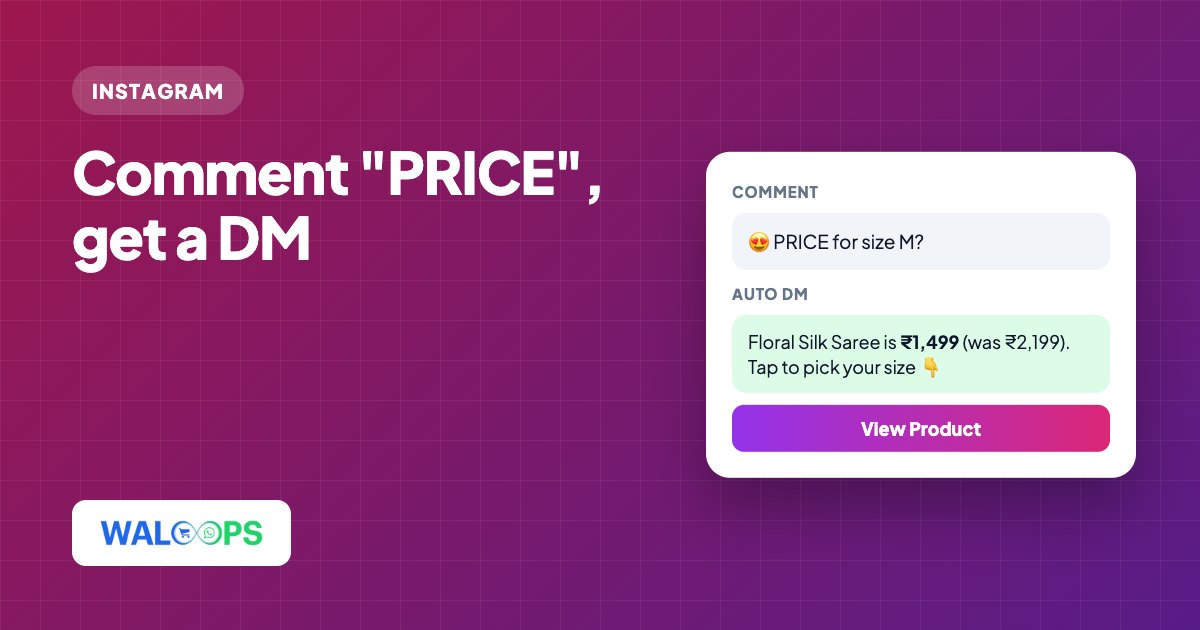
- "Comment PRICE and we'll DM you" posts work because the buyer gets the answer in private, at once, and you get a DM conversation to sell in.
- Instagram allows a business to send one private reply to a comment, even if the person has never messaged you. That is what comment-to-DM tools use.
- A good setup pairs a short public reply ("Sent you a DM!") with a DM that has the product, the price and a link.
- The reply must quote the right product for each post. Otherwise one automation sends the wrong price to every reel.
Every Indian fashion and D2C brand on Instagram knows the comments: "price?", "pp", "link pls", "size M available?". Answering them by hand takes hours, and a slow answer is a lost sale. Comment auto-reply answers each one in seconds, publicly and by DM. This guide covers how it works, how to set it up, and the mistakes that make it backfire.
How Instagram comment-to-DM works
There are two ways to answer a comment automatically:
| Reply type | Who sees it | Good for |
|---|---|---|
| Public reply | Everyone, under the comment | Showing the post is active and telling the person to check their DMs |
| Private reply (DM) | Only the commenter, in their Instagram inbox | Price, sizes, product link, discount code |
A private reply is a special kind of DM that Instagram lets a business send in response to a comment, even when the commenter has never messaged the business. Instagram allows one private reply per comment. When the person replies to that DM, a normal conversation opens and you can keep chatting for 24 hours after each of their messages.
Set up comment auto-reply step by step
These steps use WALoops. Other tools follow the same pattern.
- Connect Instagram. In WALoops, open Instagram → Account and log in with Instagram. It works with any Business or Creator account and uses the official Instagram API, so you never share your password.
- Pick a template. Open Instagram → Auto-DM, click New automation and choose "Comment a keyword, get the link", or start from scratch.
- Add keywords. Type each keyword and press Enter: price, pp, link, details. Any one keyword matches, and matching ignores upper and lower case. You can also answer every comment.
- Choose the posts. Run it on all posts and reels, or only on the ones you pick, such as this week's launch reel.
- Choose "Reply + DM". Write a few short public replies, one per line. WALoops rotates them so the comments don't fill up with the same line.
- Pick the DM format. Plain text, text with a button, a single product card, or a carousel of up to 10 products. A live preview shows what the buyer will see.
- Write the DM with placeholders. For example: Hi! {title} is {price}. Tap below to see sizes. The placeholders are filled from the product in that post. Save, and new comments are answered from then on.
Make sure each post quotes the right product
The common failure with comment automation is one fixed reply for every post. The saree reel and the kurta post both get the same price, and buyers notice.
WALoops avoids this by matching each post or reel to a product in your store. It reads the SKU or style code in the caption (for example Style: FS-1499), so you don't tag anything by hand, and you can override the match for any post. The placeholders then pull live data from that product:
| Placeholder | Becomes |
|---|---|
{title} | Product title |
{price} | Current price (the variant's price if a variant is linked) |
{url} | Product page link |
{Fabric}, {Size} and others | That variant option, if the product has one |
If a post has no product, or a placeholder can't be filled, no reply is sent. That's on purpose: no reply is better than a wrong price.
Example replies that convert
Public reply
DM with a button
[ View Product ]
Carousel DM
For "full collection", "more colours" or "all prices" posts, send a carousel of product cards. Each card has the image, price, compare-at price and a buy button, so the buyer can browse without leaving Instagram. See carousel cards for how they look.
Turn comments into followers and leads
The DM doesn't have to be the end. Two optional steps turn a comment into something you keep:
- Follow to unlock. The DM asks the person to tap a button. WALoops checks whether they follow you, and only then sends the link. Non-followers get a Follow button first.
- Collect an email or phone number. The DM asks for an email before sending the reward, and the answer is saved as a lead you can download.
Mistakes to avoid
- Too many keywords. "hi" or "nice" will DM everyone who compliments the post. Stick to buying words: price, pp, link, size, details, cost, rate.
- Spammy public replies. Keep the public reply short and friendly, and vary it across rules. Identical long replies on every comment look like a bot.
- Forgetting the caption call to action. Say "Comment PRICE for details" in the caption or on the reel. Telling people what to comment brings more comments.
- No one watching the replies. When buyers answer the DM ("do you have XL?"), someone has to reply within 24 hours, or an AI agent has to.
- Unofficial tools. Tools that ask for your Instagram password or run a browser bot risk your account. Use one built on the official Instagram API.
Comment auto-reply is one part of Instagram automation, and plans start at ₹499 ($5) a month: see Instagram auto DM pricing. To answer the DMs it starts, see Instagram DM automation for online stores.