
 On the Shopify App Store
Shopify WhatsApp Integration
Send every Shopify order update to your customer's WhatsApp automatically: order confirmation, shipped with tracking, delivered and a review request. Add COD confirmation and abandoned cart reminders when you need them. Install the free app and messages start from the WALoops number, with no Meta setup.
- check_circle Free plan, 100 messages included
- check_circle Official WhatsApp Business API
- check_circle No code, no Meta developer app
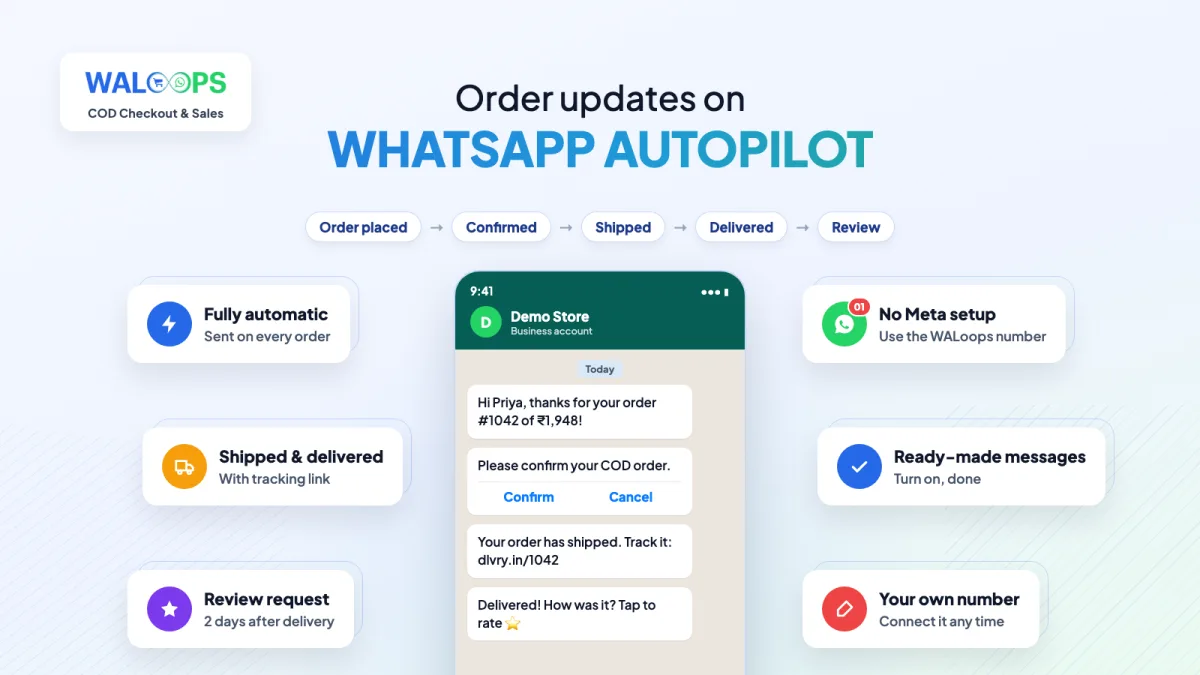
What your Shopify store can send on WhatsApp
Each message is triggered by a real Shopify event, so it goes out the moment the order changes, with the customer's name, order number and total filled in. Every message has its own on/off switch in the app.
WhatsApp order notifications
An order confirmation when a prepaid order is placed, a shipped message with the tracking number when you fulfil it, a delivered message when the courier marks it delivered, and a review request two days later.
Shopify WhatsApp order confirmation guide arrow_forwardCOD order confirmation
Cash on Delivery buyers get a message with Confirm Order and Cancel Order buttons. Confirm tags the order "WhatsApp Confirmed" in Shopify so your team knows to ship it; Cancel cancels the order in Shopify before you pay a courier.
How COD verification works arrow_forwardAbandoned cart reminders
When a shopper leaves checkout after entering their phone number, they get a WhatsApp reminder with a link back to the same cart. Premium adds up to three reminders on your own schedule.
Shopify abandoned cart recovery on WhatsApp arrow_forwardCOD to prepaid
An hour after a COD order, offer your prepaid discount and a link to pay online. Every buyer who switches is a parcel that can't come back unpaid.
6 ways to get more prepaid orders arrow_forwardAlso in the app: a WhatsApp support button on every store page (Premium), and live chat with AI replies (Advance). Replies to any order message land in your WALoops inbox.
How to connect Shopify to WhatsApp
Three steps, no code and no Meta developer account.
-
1
Install the app
Install WALoops COD Checkout & Sales from the Shopify App Store and approve the permissions. Your WALoops account is created for you.
-
2
Switch on the messages you want
Open WALoops → WhatsApp inside Shopify admin. The messages are already written and approved by WhatsApp; turn each one on and preview it. They go out from the WALoops number, with your store's logo on each message.
-
3
Move to your own number (Starter)
Click Connect your number on the same page and finish Meta's signup window. WALoops gets the same messages approved on your number and switches sending over by itself, so customers see your business name. New to this? Read how to get the WhatsApp Business API.
Want a WhatsApp chat button too, or wondering how this differs from a button app? See how to add WhatsApp to Shopify.
Build your own Shopify WhatsApp automation
The ready-made messages cover most stores. For anything else, the WALoops dashboard lets you pick a Shopify event, add conditions such as payment method contains COD or total above ₹2,000, and send any approved template, after a delay if you like.
Shopify events you can start from
Actions WhatsApp can take in Shopify
A tap on a WhatsApp button can change the order in Shopify, so your team doesn't have to.
| Action | Typical use |
|---|---|
| Add or remove tags | Tag COD orders the buyer confirmed |
| Cancel order | Buyer tapped Cancel on a COD order |
| Add a note | Record the buyer's WhatsApp answer on the order |
| Mark as paid | Buyer paid the COD amount online |
| Close or reopen order | Tidy up orders after delivery or a return |
WALoops vs a WhatsApp chat button app
Most "Shopify WhatsApp apps" add a button that opens WhatsApp on the shopper's phone. That's useful, but it can't send anything by itself. For a wider look, read our comparison of the best Shopify WhatsApp apps.
| Chat button app | WALoops | |
|---|---|---|
| Sends order updates automatically | No | Yes |
| Official WhatsApp Business API | No | Yes |
| COD confirmation that updates the Shopify order | No | Yes (Starter) |
| Abandoned cart reminders | No | Yes (Starter) |
| Chat button on the store | Yes | Yes (Premium) |
| Team inbox for replies | Your own phone | Shared inbox |
| Cost | Often free | Free plan with 100 messages; Starter $9.99/month |
What Shopify WhatsApp messages cost
The app is free to install and the Free plan includes 100 WhatsApp messages from the WALoops number. Starter ($9.99 a month, billed by Shopify) adds COD confirmation, cart recovery, COD to prepaid and your own WhatsApp number. On your own number WALoops adds no per-message charge; Meta bills its own rate. Order updates are utility messages, about ₹0.115 each in India before GST; cart reminders are marketing messages, which cost more. Details in our WhatsApp Business API pricing guide.
See the Shopify app plansShopify WhatsApp guides
How to add WhatsApp to Shopify
Chat button, order messages or the full API: the three ways, with free button code.
receipt_longShopify WhatsApp order confirmation
Which order messages to send, examples that pass Meta review, and what they cost.
compare_arrowsBest Shopify WhatsApp apps
Meta's free app, chat buttons and marketing platforms compared, with prices.
remove_shopping_cartAbandoned cart recovery on WhatsApp
Timing, messages and offers that bring shoppers back.
syncReduce COD RTO on Shopify
8 fixes for Indian stores, in the order to add them.
passwordCOD OTP verification
Stop fake COD orders before they're placed.
Frequently asked questions
Does Shopify have a WhatsApp integration? expand_more
Is there a free Shopify WhatsApp integration? expand_more
How do I connect WhatsApp to my Shopify store? expand_more
Can Shopify send order confirmation on WhatsApp automatically? expand_more
Can I send messages from my own WhatsApp number? expand_more
Is this the official WhatsApp Business API? expand_more
How much does Shopify WhatsApp integration cost? expand_more
Do customers need to opt in? expand_more
Connect Shopify to WhatsApp today
Order updates, COD confirmation and cart recovery on the official WhatsApp API. Free to install, 100 messages included.
✓ No credit card required ✓ 7-day free trial ✓ Cancel anytime