
 WooCommerce & WordPress
WooCommerce WhatsApp Integration
Send every WooCommerce order update to your customer's WhatsApp automatically: order confirmations, shipping and delivery updates, COD confirmation and abandoned cart reminders. Install the free plugin, click Connect, and your first 100 messages are free. No Meta developer setup to start.
- check_circle Free plugin, one-click connect
- check_circle Works with any payment gateway
- check_circle First 100 messages free
WhatsApp to +91 98XXXXXX21
Hi Aarav, thanks for your order #4021 of ₹1,899. Please confirm your Cash on Delivery order so we can ship it today.
Confirm order · Cancel order
What your WooCommerce store can send on WhatsApp
Each message is triggered by a real WooCommerce event, so it goes out the moment the order changes, with the customer's name, order number, products and total filled in.
WhatsApp order notifications
An order confirmation the moment an order is placed, with separate messages for prepaid and Cash on Delivery orders. Then a message for every status that matters to you: processing, on hold, completed, cancelled or refunded.
Set up WooCommerce order notifications arrow_forwardCOD order confirmation
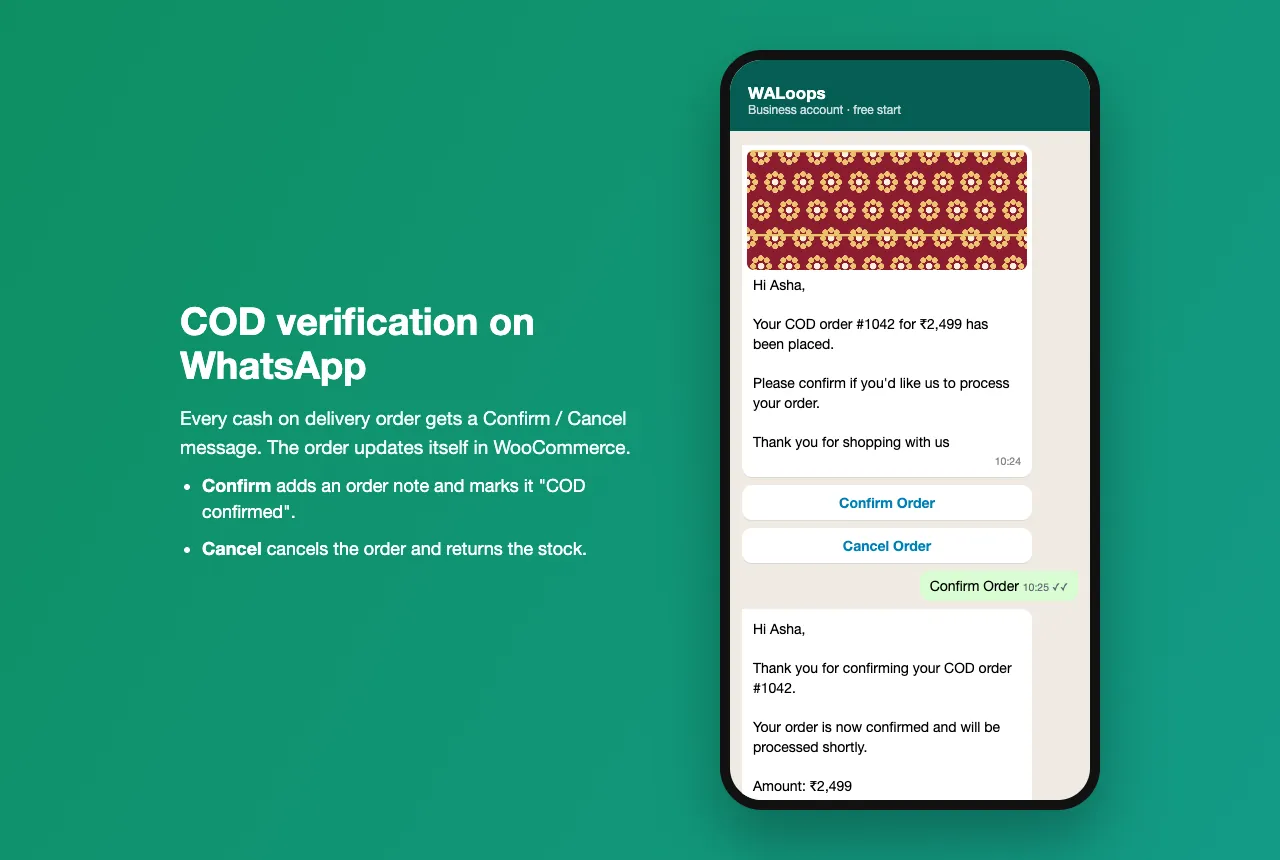
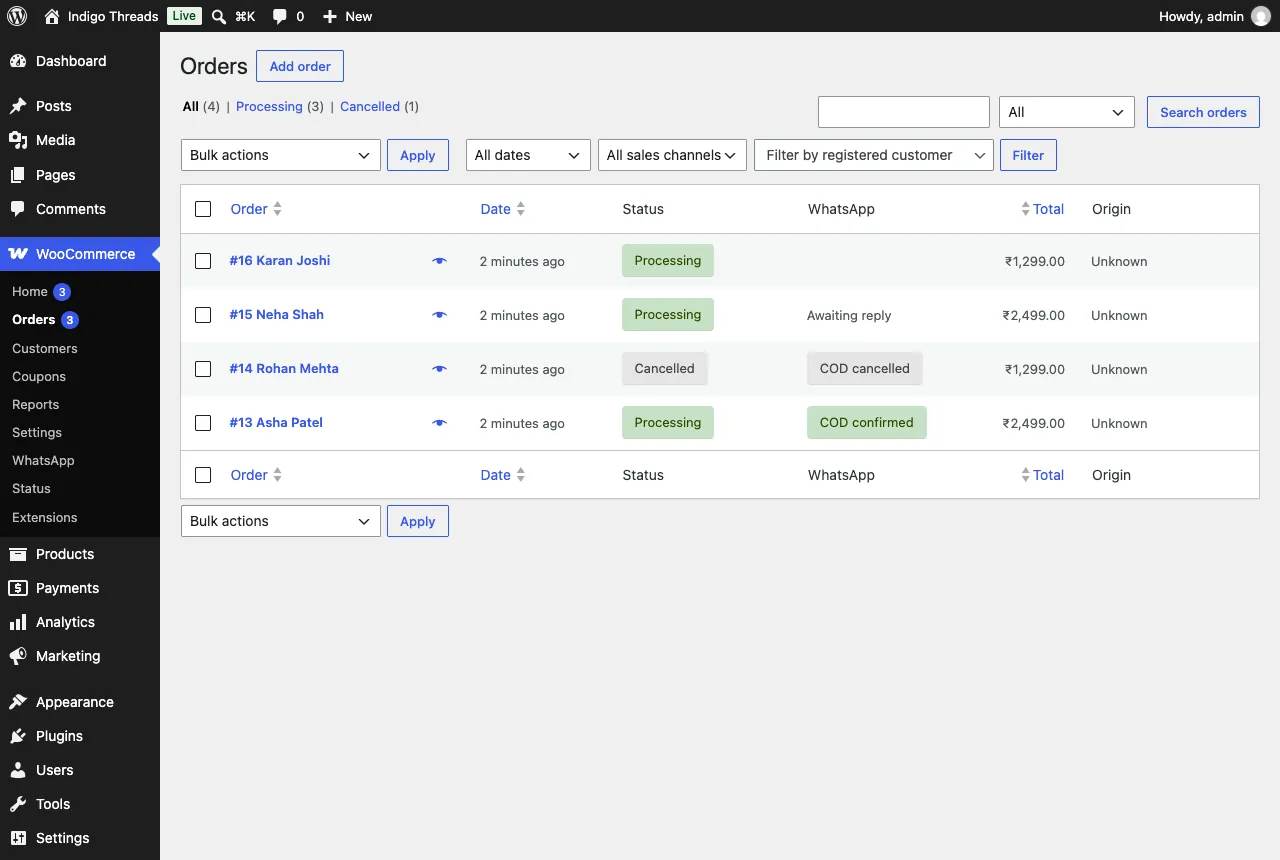
Ask every Cash on Delivery buyer to confirm with one tap before you ship. Confirm adds an order note; Cancel cancels the order in WooCommerce and puts the stock back. A WhatsApp column in your Orders list shows who confirmed, so you cut RTO on fake or impulse orders.
How COD verification works on WooCommerce arrow_forwardAbandoned cart reminders
When a shopper types their phone number at checkout and leaves, the free plugin saves their cart and sends one WhatsApp reminder. The link in it rebuilds the cart, coupons included, on any device. Works with the classic and block checkout.
WooCommerce abandoned cart recovery guide arrow_forwardReplies, support and AI answers
When customers reply to an order message, the chat lands in a shared team inbox. On Premium, an AI agent can answer common questions like delivery time or return policy for you.
Free WooCommerce WhatsApp plugin
Most WooCommerce WhatsApp notification plugins make you create a Meta developer app and paste access tokens, or sign up for a monthly WhatsApp platform, before the first message. Ours sends from the WALoops number from the first minute, then moves to your own number when you're ready.
How to connect WooCommerce to WhatsApp
Three steps, no code and no WooCommerce API keys.
-
1
Install the free plugin
In WordPress go to Plugins → Add New Plugin, search for WALoops and install WALoops Order Notifications. Then activate it. Full setup guide.
-
2
Click Connect
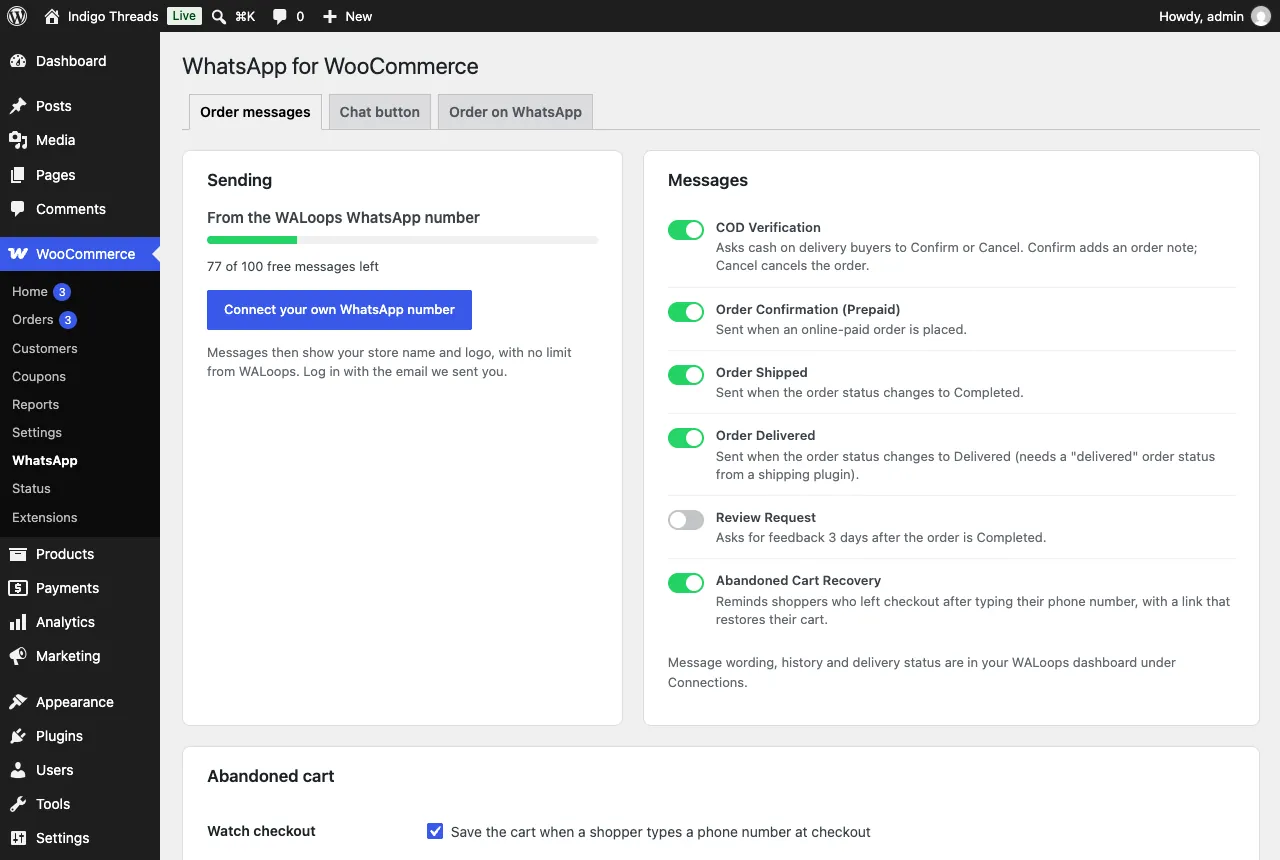
Open WooCommerce → WhatsApp, enter your email and WhatsApp number and click Connect for free. Your WALoops login is emailed to you and order messages start from the WALoops number, 100 free.
-
3
Connect your own number when you're ready
Connect your number to the official WhatsApp Business API through Meta's signup window in your WALoops dashboard. WALoops gets the same message templates approved on your number and moves sending over by itself. New to this? Read how to get the WhatsApp Business API.
Rather not install a plugin? Paste a WooCommerce REST API key (Read/Write) into WALoops under Automation → Apps instead; WALoops registers signed order webhooks on your store. Abandoned cart reminders need the plugin.
Order details you can use in messages
Every WooCommerce order event carries these fields. Put any of them into a WhatsApp template, or use them as conditions, for example "only send when the payment method is Cash on Delivery".
WALoops vs a WhatsApp chat button plugin
Most "WooCommerce WhatsApp plugins" add a chat button that opens WhatsApp on the shopper's phone. That's useful, but it can't send anything by itself. See our comparison of WooCommerce WhatsApp plugins.
| Chat button plugin | WALoops | |
|---|---|---|
| Sends order updates automatically | No | Yes |
| Official WhatsApp Business API | No | Yes |
| COD confirmation with buttons | No | Yes |
| Abandoned cart reminders | No | Yes |
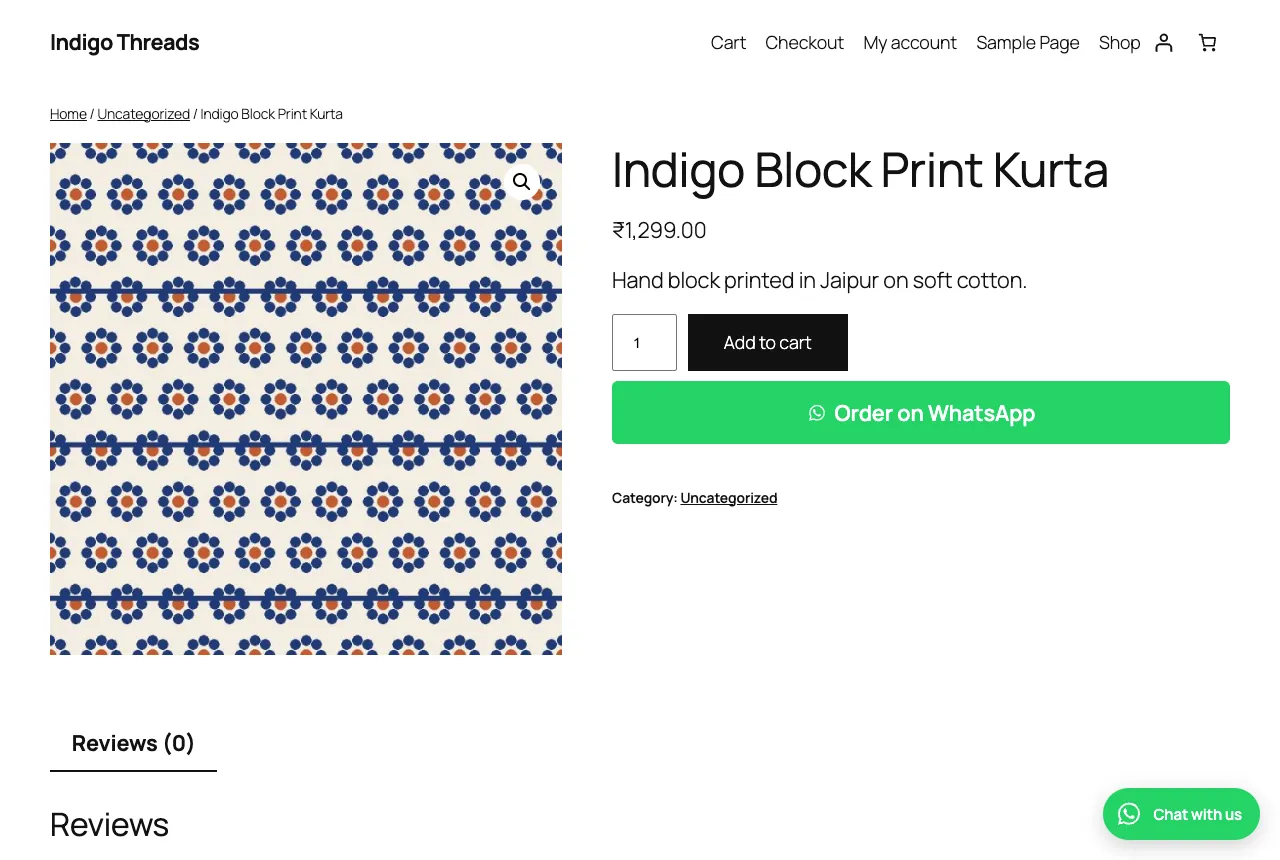
| Chat button and Order on WhatsApp button | Yes | Yes, included |
| Team inbox for replies | Your own phone | Shared inbox (paid plans) |
| Cost | Often free | Free plugin, 100 free messages, then Meta rates on your number |
What WooCommerce WhatsApp messages cost
The plugin is free and your first 100 order messages are free from the WALoops number. After that, connect your own WhatsApp number: WALoops adds no per-message charge, and Meta bills its own rate. Order updates are utility messages, about ₹0.115 each in India before GST; cart reminders are marketing messages, which cost more. Paid plans from $9.99 a month add the shared team inbox, broadcasts and chatbots. Details in our WhatsApp Business API pricing guide.
See all plansMore WALoops tools for WooCommerce
Express Checkout for WooCommerce
Side cart and one-page checkout with WhatsApp OTP login and COD controls. Free on WordPress.org.
passwordWhatsApp OTP Login
Passwordless login and signup by WhatsApp code, for WordPress and WooCommerce.
storefrontWhatsApp for ecommerce
Broadcasts, chatbot flows, AI support and cart recovery for online stores of any size.
Frequently asked questions
How do I integrate WhatsApp with WooCommerce? expand_more
Is there a free WooCommerce WhatsApp plugin for order notifications? expand_more
Do I need to install a plugin on my WordPress site? expand_more
Can WooCommerce send order notifications to the customer's WhatsApp automatically? expand_more
Does it work with Cash on Delivery? expand_more
Is this the official WhatsApp Business API? expand_more
How much does it cost? expand_more
Can I send messages from my own WhatsApp number? expand_more
Does it slow down my WooCommerce store? expand_more
Connect WooCommerce to WhatsApp today
Order updates, COD confirmation and cart reminders on the official WhatsApp API. Free plugin, first 100 messages free.
✓ No credit card required ✓ 7-day free trial ✓ Cancel anytime