Fix "Your Business AI Agent Is Already Linked to This Phone Number" (WhatsApp Coexistence)
Meta's error points to an "AI replies" menu that no longer exists. The real path to disconnect Meta Business Agent and fix WhatsApp coexistence errors.
 WALoops team
calendar_month
schedule4 min read
WALoops team
calendar_month
schedule4 min read
In this guide
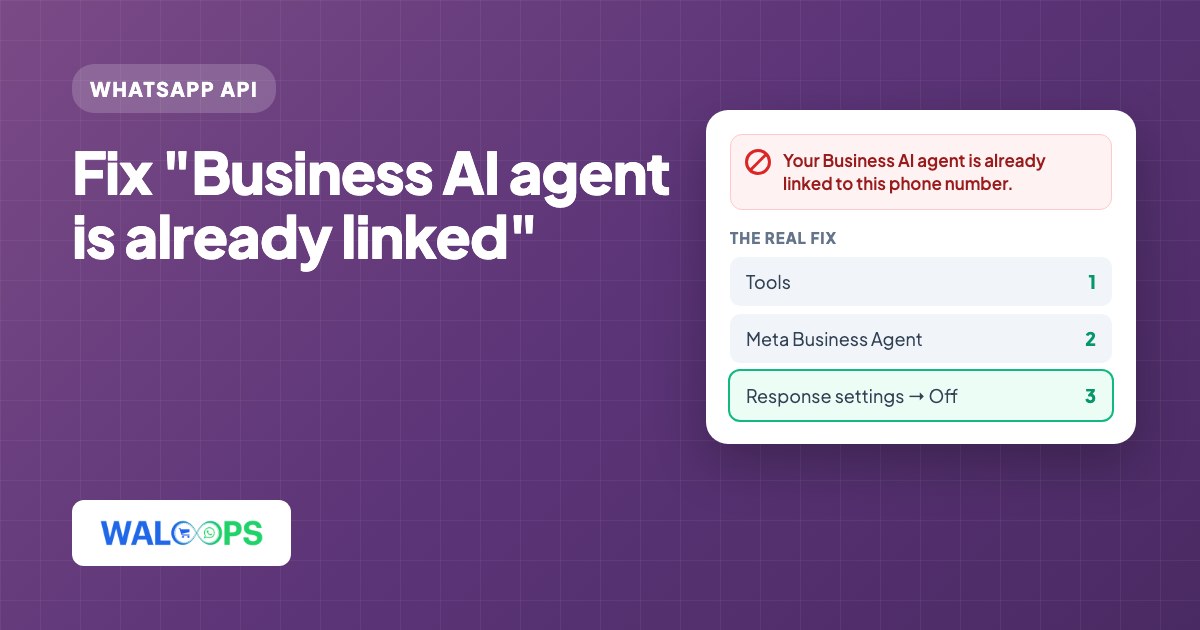
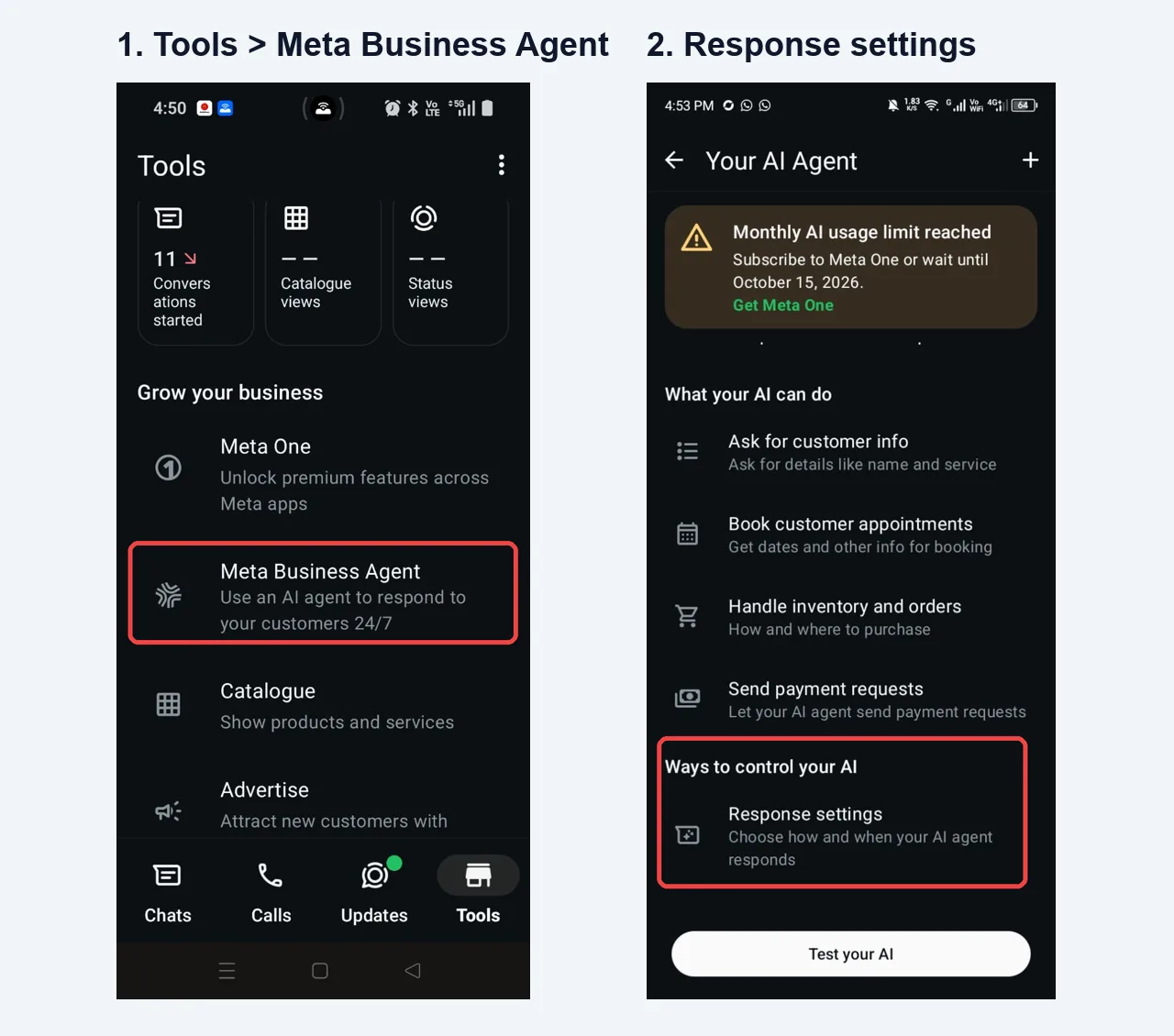
Quick answer: the error "Your Business AI agent is already linked to this phone number" means Meta's own AI agent (Meta Business Agent, also called Business AI) is still switched on in the WhatsApp Business app. Open WhatsApp Business, go to Tools > Meta Business Agent > Your AI Agent > Response settings, turn the AI agent off, then close the Facebook popup and connect your number again. Meta's error text points to a "Business Tools > Your Business AI > AI replies" menu that the current app doesn't have.
- The error appears when you connect a WhatsApp Business app number to a WhatsApp API platform (Meta calls this coexistence) while Meta's own Business AI agent is still switched on for that number.
- Meta's message tells you to go to Business Tools > Your Business AI > AI replies. That menu doesn't exist in the current app.
- The real path: Tools > Meta Business Agent > Your AI Agent > Response settings, then turn the AI agent off for your number.
- Then close the Facebook popup completely and start the connection again. The old popup keeps the old error.
- If you first saw "Selected business CoEx gate evaluation is missing", it's usually the same cause: disconnect the AI agent and retry.
More businesses in India now use Meta's free AI agent inside the WhatsApp Business app to answer customers. It works fine on its own, but it blocks one thing: connecting the same number to the WhatsApp Business API with coexistence, so you can keep using the app and send automated messages from a platform such as WALoops.
We hit this with a client this week. Meta's error message points to a menu that isn't in the app any more, so here is what actually works.
What the error looks like
You start connecting WhatsApp, pick your business portfolio, enter your WhatsApp Business app number and press Next. The Facebook popup stops with:
Some people see a different error one step earlier, on the business profile screen, with the Next button greyed out:
Why does Meta block the connection?
Only one system can answer automatically on a number. When Meta's Business AI agent is on, it replies to your customers. If an API platform were connected at the same time, both would reply to the same chat, so Meta refuses the connection until the AI agent is unlinked.
Running out of the AI agent's monthly quota doesn't count. Even with the "Monthly AI usage limit reached" banner showing, the agent is still linked and still blocks the connection.
How to disconnect the Meta Business AI agent (real steps)
Do this on the phone that has the WhatsApp Business app for that number. These steps were tested in October 2026 on Android.
- Update WhatsApp Business from the Play Store or App Store, then open it.
- Tap the Tools tab at the bottom.
- Under Grow your business, tap Meta Business Agent ("Use an AI agent to respond to your customers 24/7").
- On Your AI Agent, scroll to Ways to control your AI and tap Response settings.
- Turn the AI agent off for your number (disconnect it), and confirm.
Connect your WhatsApp Business number again
- Close the Facebook popup completely. Don't press Back or Next in the old one. It remembers the old check and can show the same error again.
- In WALoops, click Connect WhatsApp again and log in with Facebook.
- Pick the same business portfolio and choose to connect your existing WhatsApp Business app number.
- On your phone, confirm the connection in the WhatsApp Business app (scan the QR code or accept the prompt).
- Choose to share your chat history if you want your existing chats in the WALoops inbox.
After this you keep using the WhatsApp Business app as before, and WALoops can send order updates, COD confirmations and cart reminders from the same number.
Still stuck?
- Same error right after disconnecting: wait 10 to 15 minutes and try again in a fresh browser window. Meta's check doesn't always update at once.
- "CoEx gate evaluation is missing" with no AI agent on: try creating a new business portfolio in the popup instead of choosing the existing one, and make sure the number has been in normal use on the Business app (not brand new).
- Want to keep Meta's AI agent? You can't use it and an API platform on the same number. WALoops has its own AI agent that answers from your catalogue and hands over to a person when needed.
- Need help? Message our support team on WhatsApp and we'll connect it with you on a call.