Shopify Telegram Order Notifications: Free Setup in One Minute
Get every Shopify order, cancellation and COD confirmation on Telegram. Compare the three ways to set it up and connect a shared bot with one tap, no bot token or chat ID.
 WALoops team
calendar_month
schedule3 min read
In this guide
- Shopify's own app only pings the person logged in to it. A Telegram alert reaches you, a partner or a whole team group, with the order details in the message.
- Most Telegram alert tools ask you to create a bot in BotFather and copy a chat ID. With a shared bot you tap one link and press Start.
- Telegram is for you and your team. Bots can't message shoppers first, so buyer updates belong on WhatsApp.
When an order comes in, most store owners want to know three things right away: how much it is, whether it is cash on delivery, and where it is going. Shopify's own notifications tell you an order arrived, but they go to one app on one phone, and sharing them with a packer or a partner means sharing your admin login. Telegram fixes that: it is free, fast, works on every phone and desktop, and a group can hold your whole team.
Three ways to get Shopify orders on Telegram
| Option | Setup | Good for |
|---|---|---|
| Build your own bot | Create a bot in BotFather, find your chat ID, then connect it with a script or an automation tool that calls the Telegram Bot API on each new order | Developers who want full control |
| A Telegram alert app that needs your bot token | Create a bot in BotFather, paste the token into the app, send a message to the bot so the app can find your chat | Stores that only want alerts and don't mind the setup |
| A shared bot (WALoops) | Tap Connect Telegram, press Start. No token, no chat ID | Stores that also want WhatsApp order messages and COD checks for buyers |
The most common complaint about the first two options is the chat ID step, and group setup in particular: the bot has to be added to the group and the group's ID found before any alert arrives. A shared bot with a one-time link skips all of that.
Set up Shopify Telegram order notifications with WALoops
- Install the WALoops Shopify app and approve it in your Shopify admin. Orders start syncing right away.
- Open Account → Telegram alerts in WALoops and tap Connect Telegram. Telegram opens the WALoops Alerts bot.
- Press Start. The bot replies "Connected to WALoops", and the chat shows up in WALoops a few seconds later.
- Choose what to send: New order, Order cancelled, COD confirmed by buyer and COD cancelled by buyer. Tap Send test alert to check.
To alert your team, tap Add to a group instead and pick the group in Telegram. You can link your own chat and several groups; every alert goes to all of them.
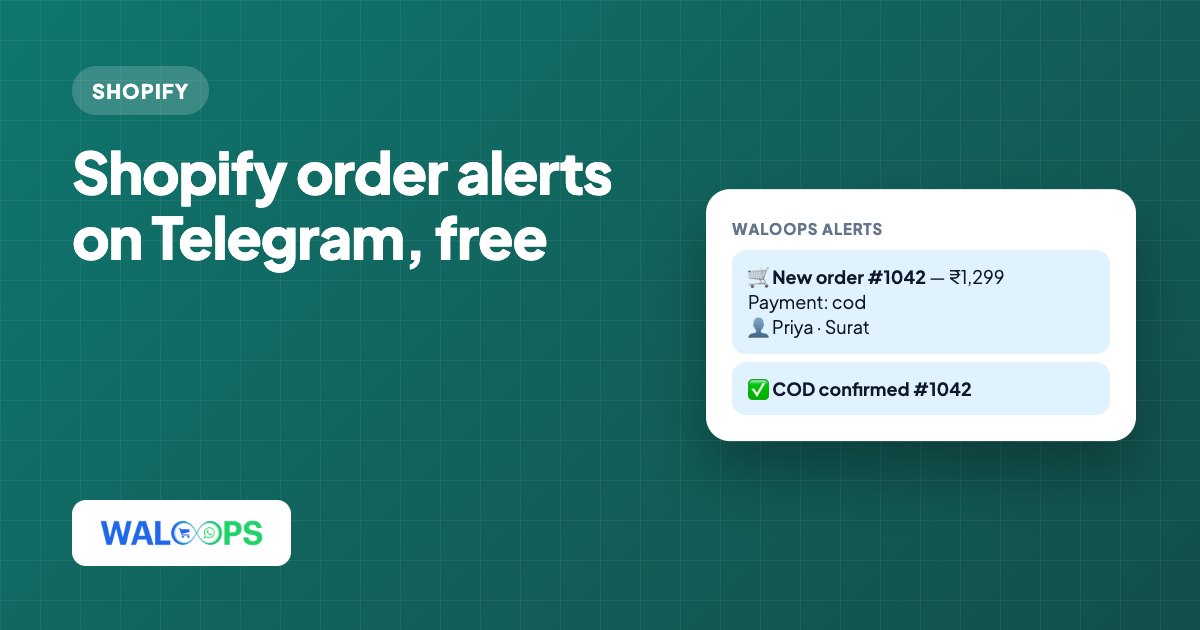
What a new-order alert looks like
- Payment: cod
- 👤 Priya Shah · Surat
- 📦 Photo magnets x2
- 🏷 Coupon: WELCOME10
Every alert is an automation you can edit under Automations. Add any order field, such as SKU, phone number or full address, or remove lines you don't need. A line whose fields are empty, like the coupon line on an order with no coupon, is left out on its own.
Alerts worth turning on
- New order, so you can pack the same day.
- Order cancelled, so nobody ships a cancelled parcel.
- COD confirmed or cancelled by the buyer. If you use the WALoops WhatsApp COD check, the buyer's Confirm or Cancel tap shows up in Telegram, so you know which COD orders are safe to ship.
Telegram for you, WhatsApp for buyers
A Telegram bot can only message someone who started it first, so it can't send order confirmations or shipping updates to shoppers. That is what WhatsApp is for. WALoops runs both from one account: buyers get order messages and COD checks on WhatsApp for Shopify, and you get the alerts on Telegram. See the full feature list on the Telegram order notifications page.