How to Send WooCommerce Orders to Your WhatsApp (New Order Alerts)
Get every new WooCommerce order on your own WhatsApp, or your packer's, with products, total, payment method and PIN code. Setup in 15 minutes.
 WALoops team
calendar_month
schedule4 min read
In this guide
- Can WooCommerce send new order alerts to WhatsApp?
- How do I send WooCommerce orders to my WhatsApp number?
- What should a WhatsApp order alert say?
- Can I get different alerts for COD and prepaid orders?
- Who else can get WooCommerce order alerts on WhatsApp?
- How much do WhatsApp order alerts cost?
- Common problems
- WooCommerce emails new orders to the admin, but it can't send them to WhatsApp by itself.
- With WALoops, an automation with the recipient set to Manual sends every new order to a fixed number: yours, your packer's or your manager's.
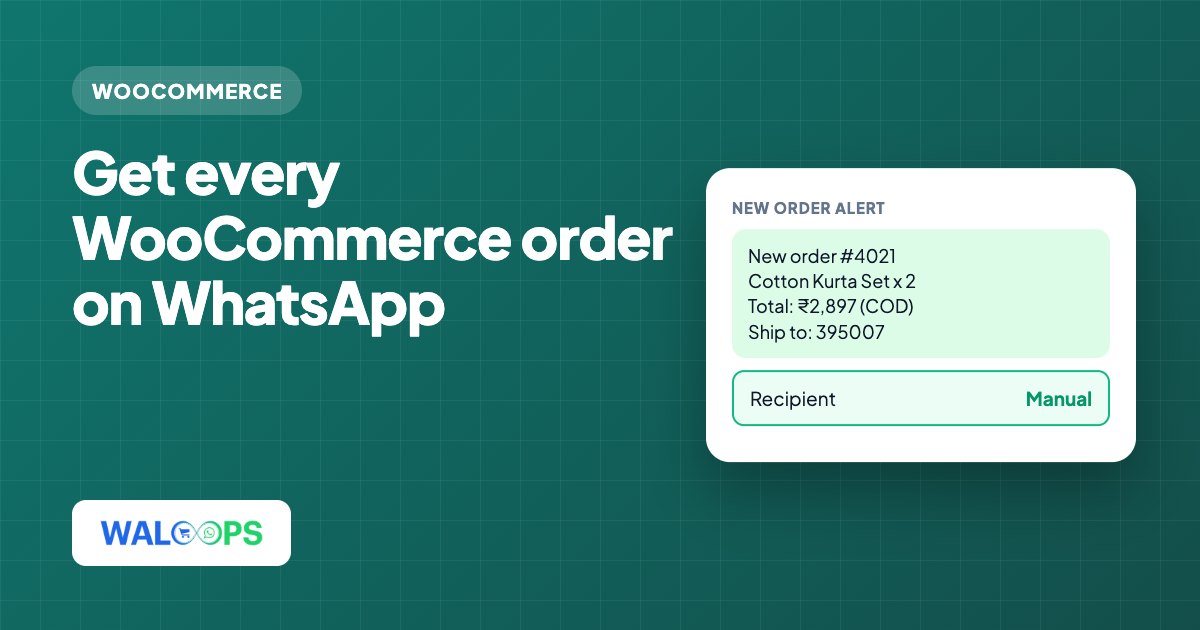
- The alert can include the order number, customer name, phone, products, total, payment method and PIN code.
- Add a condition such as "payment method is Cash on Delivery" to get separate alerts for COD and prepaid orders.
To send WooCommerce orders to your own WhatsApp, connect your store to WALoops and create an automation on the WooCommerce "order created" event with the recipient set to Manual and your phone number entered. Every new order then arrives on WhatsApp within seconds with the order number, products, total and payment method filled in.
Email alerts get buried. A WhatsApp alert reaches the person who packs the parcel, even when they are away from a computer. This guide covers the setup, what to put in the alert, and how to send different alerts to different people.
Can WooCommerce send new order alerts to WhatsApp?
Not on its own. WooCommerce's built-in "New order" notification is an email to the admin address. To get the same alert on WhatsApp you need a WhatsApp Business API sender, because WhatsApp doesn't accept automatic messages from a normal phone app.
WALoops listens to your store's order events and sends a WhatsApp template to whichever number you choose. The same event can also send the customer their own order confirmation; the two are separate automations.
| Customer notification | Owner alert | |
|---|---|---|
| Who receives it | The buyer's phone from the order | A fixed number you enter |
| Recipient setting | Auto | Manual |
| Typical content | Thanks, order number, total | Products, quantity, payment method, PIN code, customer phone |
| Guide | Order notifications | This post |
How do I send WooCommerce orders to my WhatsApp number?
Connect the store, approve one alert template, then create one automation with a Manual recipient. It takes about 15 minutes, most of it waiting for template approval.
- Connect WooCommerce to WALoops. Install the free WALoops Order Notifications plugin and click Connect in WooCommerce → WhatsApp. If you'd rather not install a plugin, paste a WooCommerce REST API key (Read/Write) under Automation → Apps → WooCommerce instead.
- Connect your own WhatsApp number on the Starter plan ($9.99 a month), so the alert template is approved on your number.
- Create the alert template in WALoops, with variables for the order details you want. Submit it as a utility template.
- Create an automation. Choose WooCommerce as the trigger and order created as the event, and WhatsApp as the action with your alert template.
- Set the recipient to Manual. In Recipient (To), switch from Auto to Manual and enter the number that should get the alert, with the country code, for example 919876543210.
- Map the fields into the template variables and save.
- Place a test order and check the alert arrives with every field filled in.
What should a WhatsApp order alert say?
Put the details someone needs to pack and ship without opening WordPress: what to pack, where it goes and whether to collect cash.
These are the WooCommerce order fields you can use in the template or in conditions:
| Group | Fields |
|---|---|
| Customer | Name, phone, email |
| Order | Order number, status, total, tax, shipping, discount, coupon codes, payment method, customer note |
| Items | Products, SKU, quantity |
| Shipping | Shipping address and PIN code |
Can I get different alerts for COD and prepaid orders?
Yes. Add a condition to the automation on the payment method field. Create one automation where the payment method is Cash on Delivery and another for everything else.
- COD alert: remind the packer to wait for the buyer's WhatsApp confirmation before shipping. The COD verification guide explains how buyers confirm with one tap.
- Prepaid alert: ship today.
- High-value alert: a condition on the total, for example over ₹5,000, sent to the owner only.
Who else can get WooCommerce order alerts on WhatsApp?
Anyone with a WhatsApp number, as long as each person has its own automation. Common setups in Indian stores:
- The packer or warehouse: products, quantity and PIN code only.
- A dropship supplier or print partner: a condition on SKU so they only see their products.
- The owner: every order, or only high-value ones.
Use only numbers of people who expect these messages. If someone keeps blocking or reporting them, your number's quality rating can drop like it would for customer messages.
How much do WhatsApp order alerts cost?
On your own number, WALoops adds no per-message charge; Meta bills its utility rate to your WhatsApp account, about ₹0.12 per message in India before GST. A store with 30 orders a day pays Meta roughly ₹100 a month for owner alerts. Starter is $9.99 a month with a 7-day free trial.
Common problems
- No alert arrives: check the Manual number has the country code, and that the template is approved. The automation's log shows each attempt and the reason if it failed.
- The customer got the owner alert: the recipient is still set to Auto. Switch it to Manual.
- Template rejected: keep it plain and factual. Marketing words or offers make Meta class it as marketing.
For every WooCommerce WhatsApp feature in one place, see the WooCommerce WhatsApp integration page.